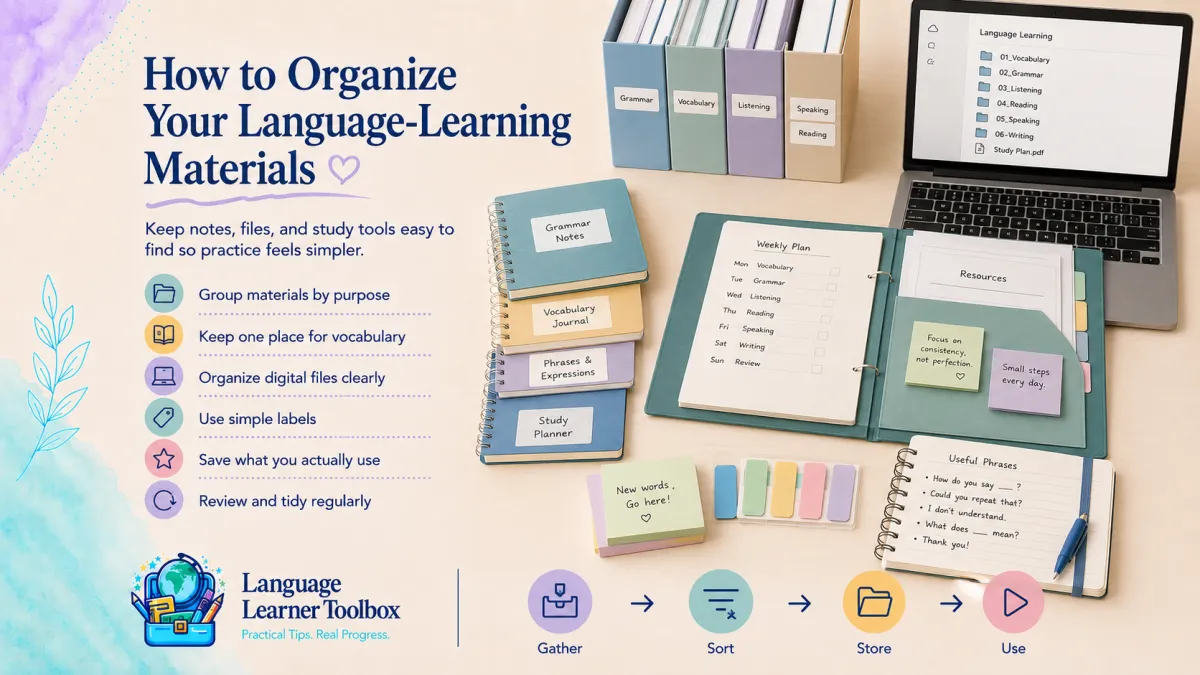
How to Organize Your Language-Learning Materials
Language-learning materials can multiply quickly.
You may have:
workbooks
loose worksheets
vocabulary lists
tutor notes
app screenshots
saved videos
podcast links
grammar explanations
conversation questions
digital downloads
bookmarked websites
notebooks
flashcards
files stored on several devices
Each resource may be useful.
The problem is that useful materials become difficult to use when they are scattered, duplicated, or buried.
You may know you saved the perfect worksheet but cannot remember where. You may take notes during tutoring sessions and never review them. You may download a guide, forget about it, and search for the same information again later.
Organization is not about creating a perfect filing system.
It is about making the next useful resource easy to find and easy to use.
A simple system should help you answer:
What am I working on now?
Where are my active materials?
What should I review?
What can I archive or remove?
What is my next step?
Begin With Your Current Goal
Do not organize everything before deciding what matters most.
Start with your current language goal.
For example:
build a consistent routine
improve speaking confidence
prepare for conversations
strengthen listening
remember useful vocabulary
improve writing
prepare for travel
study for an exam
use the language at work
Your goal should determine which materials remain active.
If speaking is your current priority, your active materials might include:
conversation questions
useful phrases
tutor notes
pronunciation practice
speaking recordings
A large grammar archive may still be valuable, but it does not need to sit at the center of your current system.
Organize around what you are doing now, not everything you might someday study.
Separate Active Materials From Stored Materials
One of the easiest ways to reduce overwhelm is to divide materials into two groups.
Active materials
These are the resources you are currently using.
They may include:
one main workbook
one notebook
one listening source
current tutor notes
this week’s vocabulary
one conversation topic
one study plan
Stored materials
These are useful resources you are not using right now.
They may include:
completed lessons
older notes
extra worksheets
future courses
archived vocabulary
reference guides
saved articles
past recordings
Keep active materials easy to reach.
Store the rest in a simple, labeled place.
This prevents every resource from competing for your attention.
Choose One Main Home for Physical Materials
Physical materials are easier to manage when they have one predictable location.
You might use:
one shelf
one drawer
one basket
one portable file box
one study bag
one desk organizer
Your main location should hold the materials you use most often.
For example:
current workbook
vocabulary notebook
tutor folder
headphones
pens
flashcards
printed study plan
Avoid spreading active materials across several rooms unless each location has a clear purpose.
The easier it is to begin, the more likely you are to practice.
Use Simple Physical Categories
You do not need many folders.
A practical system might include:
Current Practice
Materials you are using this week.
Speaking and Conversation
Questions, speaking prompts, role-plays, and partner notes.
Vocabulary
Word lists, phrase pages, and review sheets.
Listening and Reading
Transcripts, articles, and media notes.
Grammar and Reference
Explanations, charts, and correction notes.
Completed or Archived
Finished lessons and older materials you may want later.
Use broad categories.
If the system is too detailed, filing becomes harder than finding.
Keep Loose Pages From Becoming a Pile
Loose worksheets and printed pages are easy to lose.
Choose one system:
a binder with dividers
a folder for each category
a portable accordion file
a clipboard for current work
a single inbox folder for pages not yet filed
If you use an inbox folder, review it regularly.
Otherwise, the inbox becomes another permanent pile.
A simple weekly routine can be enough:
Keep current pages.
File useful reference pages.
Recycle duplicates or outdated materials.
Move completed work to the archive.
Choose One Main Digital Storage Location
Digital materials become difficult to manage when they are spread across:
email
phone downloads
cloud drives
desktop folders
screenshots
browser bookmarks
messaging apps
learning platforms
Choose one main location for files you want to keep.
This might be:
one cloud drive folder
one folder on your computer
one notes app
one document with organized links
The specific platform matters less than consistency.
When you download something useful, move it to the main location instead of leaving it in a temporary downloads folder.
Create a Simple Digital Folder System
Your digital folders can mirror your physical categories.
For example:
01 Current Practice
Materials you are actively using.
02 Speaking
Conversation topics, role-plays, and recordings.
03 Vocabulary
Word lists, phrase guides, and review pages.
04 Listening and Reading
Podcasts, transcripts, articles, and notes.
05 Grammar and Reference
Explanations, dictionaries, and correction guides.
06 Tutor or Class Notes
Session notes, assignments, and feedback.
07 Completed and Archived
Finished materials you may want later.
Using numbers at the beginning keeps the folders in a predictable order.
You do not need many sub folders unless one section becomes difficult to navigate.
Name Files So You Can Find Them Later
A file called:
worksheet-final-new2.pdf
will be difficult to recognize later.
Use descriptive names.
For example:
travel-conversation-questions.pdf
tutor-notes-july-16.pdf
past-tense-review.pdf
workplace-vocabulary-week-3.pdf
podcast-listening-notes-health-habits.pdf
A useful file name may include:
topic
resource type
date
level
skill
Keep names clear and consistent.
You are organizing for your future self.
Decide What to Do With Downloads
Downloads can accumulate quickly.
When you download a resource, make one decision:
use now
save for later
delete
Do not leave everything in the downloads folder.
If you plan to use it now, move it to Current Practice.
If it may be useful later, place it in the appropriate stored folder.
If it does not clearly support your goals, delete it.
A saved resource is not automatically a useful resource.
Organize Bookmarks by Purpose
A long bookmark list can become difficult to use.
Create a few folders such as:
Listening
Reading
Dictionaries and Reference
Speaking Practice
Tutor Resources
Current Course
Future Resources
Keep the most important links in a small Current Practice folder.
If you have not opened a bookmark in a long time and cannot explain why it matters, remove it.
You can always search for the information again if you truly need it.
Handle Screenshots Quickly
Screenshots are useful for capturing:
vocabulary
explanations
corrections
app lessons
example sentences
useful phrases
They are also easy to forget.
When you take a learning screenshot:
Decide whether it is worth keeping.
Rename or add it to a labeled album.
Transfer the important information to your notebook or notes.
Delete the screenshot when it is no longer needed.
A screenshot should be a temporary capture tool, not your permanent study system.
Keep Tutor Notes Together
Tutor notes are especially valuable because they reflect your personal mistakes, questions, and goals.
Keep them in one place.
You might use:
one notebook
one digital document
one folder
one section of a binder
Organize each session with:
date
topic
useful phrases
important corrections
pronunciation notes
assignment
next-session goal
Reviewing tutor notes becomes much easier when every session follows the same format.
Organize Corrections by Pattern
A long list of isolated mistakes is difficult to use.
Group corrections by pattern when possible.
For example:
Verb tense
I go yesterday → I went yesterday
She come last week → She came last week
Prepositions
interested on → interested in
depend of → depend on
Natural phrasing
make a photo → take a photo
strong rain → heavy rain
Patterns show you what deserves repeated practice.
You may also create a short Mistakes I Am Working On page with only two or three current priorities.
Keep Vocabulary in One Main System
Vocabulary becomes harder to review when it is scattered across:
several notebooks
app lists
loose papers
screenshots
tutor notes
flashcards
phone notes
Choose one main vocabulary system.
It might be:
a vocabulary notebook
a flashcard system
a digital document
a spreadsheet
a notes app
Other sources can feed into that system.
For example, a word from a tutor session can be transferred to your vocabulary notebook with:
the phrase
meaning
example
pronunciation
review date
The goal is not to preserve every original list.
It is to create one place for vocabulary you actually want to learn.
Separate New Vocabulary From Review Vocabulary
A useful system distinguishes between words you just noticed and words you are actively practicing.
You might use sections such as:
New
Recently collected words and phrases.
Learning
Vocabulary you are reviewing and trying to use.
Ready
Language you can recall and use comfortably.
Reference
Useful terms you do not need to review regularly.
This keeps your active review list manageable.
Organize Materials by Action, Not Only Topic
Topic folders are useful, but action-based labels can make materials easier to use.
For example:
Listen
Speak
Review
Ask My Tutor
Use This Week
Practice Again
Finished
These labels tell you what to do with the material.
A resource titled Travel Vocabulary tells you what it is about.
A label such as Practice Before Friday’s Conversation tells you what happens next.
Use both when helpful.
Create a Current Practice Folder
This may be the most useful part of your system.
Keep only the materials you need for the next week or two.
Your Current Practice folder might include:
one workbook chapter
one conversation topic
this week’s vocabulary
one podcast or video
tutor homework
a short study plan
When the week ends:
Review what you used.
Archive completed materials.
Carry forward unfinished items that still matter.
Add the next small set.
This keeps your learning focused.
Use a Weekly Learning Page
A single weekly page can connect all your materials.
It might include:
main goal
current workbook lesson
listening resource
vocabulary focus
speaking topic
tutor question
review task
next step
For example:
Goal: Speak more comfortably about work
Workbook: Complete the workplace conversation lesson
Listening: Watch one short interview about work routines
Vocabulary: Review five phrases for describing responsibilities
Speaking: Practice answering “What do you do at work?”
Tutor question: Ask about the difference between “responsible for” and “in charge of”
This page keeps your system from feeling fragmented.
Organize by Learning Cycle
You can also arrange materials around what happens during learning.
Prepare
Vocabulary, questions, examples, and background information.
Practice
Workbook activities, speaking prompts, listening, and writing.
Check
Answer keys, tutor feedback, dictionaries, and grammar references.
Review
Corrections, vocabulary review, and repeated activities.
Apply
Real-life speaking, writing, or communication tasks.
This structure helps every resource lead toward action.
Make the Next Step Obvious
At the end of a study session, leave a clear note.
For example:
Continue on page 24.
Review phrases 1–5.
Listen again without captions.
Ask tutor about question 3.
Practice the second conversation prompt.
File completed worksheet.
Choose next week’s topic.
This prevents you from opening your materials later and wondering where to begin.
Use Labels Sparingly
Color coding and labels can help, but too many categories create confusion.
Choose a small system.
For example:
teal: current practice
lavender: speaking
yellow: vocabulary
blue: reference
Or use only written labels.
The best system is one you can remember without checking instructions.
Do not spend more time decorating the system than using the materials.
Set a Limit on Active Resources
Decide how many resources you will actively use at one time.
For example:
one main workbook
one listening source
one vocabulary system
one speaking opportunity
one reference folder
Anything else can be stored for later.
A limit protects you from adding new resources every time something looks interesting.
Create a “Maybe Later” Folder
Some resources are useful but not relevant now.
Put them in one Maybe Later folder.
Do not organize each item in detail.
Review the folder every few months.
You may discover that:
some materials now fit your goals
some are duplicates
some no longer interest you
some can be deleted
This gives future ideas a home without allowing them to interrupt current practice.
Archive Completed Materials
Completed work can provide evidence of progress.
You may want to keep:
finished workbook units
old writing samples
tutor notes
speaking recordings
completed trackers
vocabulary lists
course certificates
Move them out of the active area.
Use an archive folder labeled by:
year
course
skill
project
For example:
2026 Speaking Practice
Completed Tutor Notes
Finished Workbook Lessons
Travel Preparation
The archive preserves progress without cluttering the current system.
Keep Selected Evidence of Progress
You do not need to save every page.
Keep examples that show:
an important correction
improved writing
longer speaking
completed goals
vocabulary you can now use
a difficult lesson you mastered
a meaningful conversation
a finished workbook
Reviewing these materials can help you see progress that is easy to forget.
Remove Duplicates
Language learners often save several versions of the same thing:
multiple vocabulary lists
repeated grammar charts
similar apps
duplicate downloads
several beginner guides
repeated worksheets
Compare them.
Keep the clearest or most useful version.
Delete or archive the rest.
More copies do not create more learning.
Let Go of Outdated Materials
A resource may no longer be useful because:
your level has changed
your goal has changed
the information is outdated
the format does not work for you
you found a clearer resource
you have already mastered the skill
You do not need to keep everything because it once helped.
A good system changes as you grow.
Do Not Keep Materials Out of Guilt
You may feel reluctant to remove:
an unfinished course
an expensive workbook
a teacher’s handout
a resource someone recommended
a notebook you started carefully
Ask:
Does this support my current goal?
Will I realistically use it?
Is there something better?
Would keeping one useful section be enough?
Am I saving it because I feel guilty?
The purpose of organizing is to support learning, not preserve every intention you have ever had.
Create a Regular Reset
Set a short time each week or month to reset your materials.
A weekly reset might include:
clear the desk
file loose pages
move completed work
choose current materials
review tutor notes
update the weekly plan
delete unnecessary screenshots
A monthly reset might include:
review digital folders
cancel unused subscriptions
archive completed materials
remove duplicates
reconsider current goals
choose the next main resource
A fifteen-minute reset can prevent a much larger mess later.
Keep Organization Proportional
Your system should match the amount of material you have.
If you use one workbook and one notebook, you do not need an elaborate filing structure.
If you work with several tutors, courses, and professional goals, you may need more categories.
Start with the simplest system that works.
Add complexity only when a real problem appears.
Avoid Reorganizing Constantly
Changing systems can feel like progress.
You may:
move files between apps
redesign folders
rewrite labels
create a new tracker
transfer notes repeatedly
Sometimes a new system is needed.
Often, the current system simply needs to be used consistently.
Before reorganizing, ask:
What specific problem will this change solve?
If you cannot answer, return to the language practice.
Make Materials Easy to Use, Not Merely Easy to Store
A well-organized file that you never open is still not helping.
For active materials, prioritize access.
For example:
leave the current workbook visible
bookmark the next page
keep headphones nearby
save the current podcast link at the top of your notes
place conversation questions in your study folder
put review vocabulary where you will see it
Storage protects materials.
Access helps you use them.
Build a Simple Material Flow
Every new resource can move through a clear process.
Capture
Save or collect the material.
Decide
Use now, save for later, or delete.
Place
Move it to the correct folder or notebook.
Use
Complete the activity or practice.
Review
Return to important language.
Archive
Move completed materials out of the active area.
This prevents resources from getting stuck in a permanent collection stage.
Example of a Simple Physical System
You might use:
One basket
Current workbook, notebook, headphones, and pens.
One binder
Speaking, vocabulary, listening, and grammar sections.
One folder
Loose pages to review or file.
One archive box
Completed work and older materials.
That may be enough.
Example of a Simple Digital System
You might use:
Current Practice folder
This week’s files and links.
Learning Materials folder
Speaking, vocabulary, listening, grammar, and tutor notes.
Archive folder
Completed materials.
One notes document
Important links and the next practice step.
Again, simple is enough.
Try This With Your Materials Today
Set a timer for fifteen minutes.
Then:
Gather your current language-learning materials.
Choose one main goal.
Select what you will use this week.
Place active materials together.
Create one location for stored materials.
Remove obvious duplicates.
Write down your next practice step.
Do not try to organize everything perfectly.
Create enough order to make the next session easier.
Remember This
Organization should reduce the distance between deciding to practice and actually beginning.
You do not need a perfect filing system. You need a clear home for active materials, a simple place for stored resources, and an obvious next step.
Ready for Your Next Step?
The Learning Tools & Resources page brings together practical guides, workbooks, and downloadable support to help you choose, use, and organize your language-learning materials with more purpose.
If you want to build a consistent routine around the materials you already have, the Language Learning Habit Stack Workbook can help you connect small study actions to habits already present in your day.
If your collection feels too large or scattered, read How to Build Your Personal Language-Learning Toolbox to choose a smaller set of resources with clear jobs.

